
Designated Authorized Representative
Firely Auth supports Designated Authorized Representatives (DAR), enabling users to access and manage patient data on behalf of others through delegated access tokens.
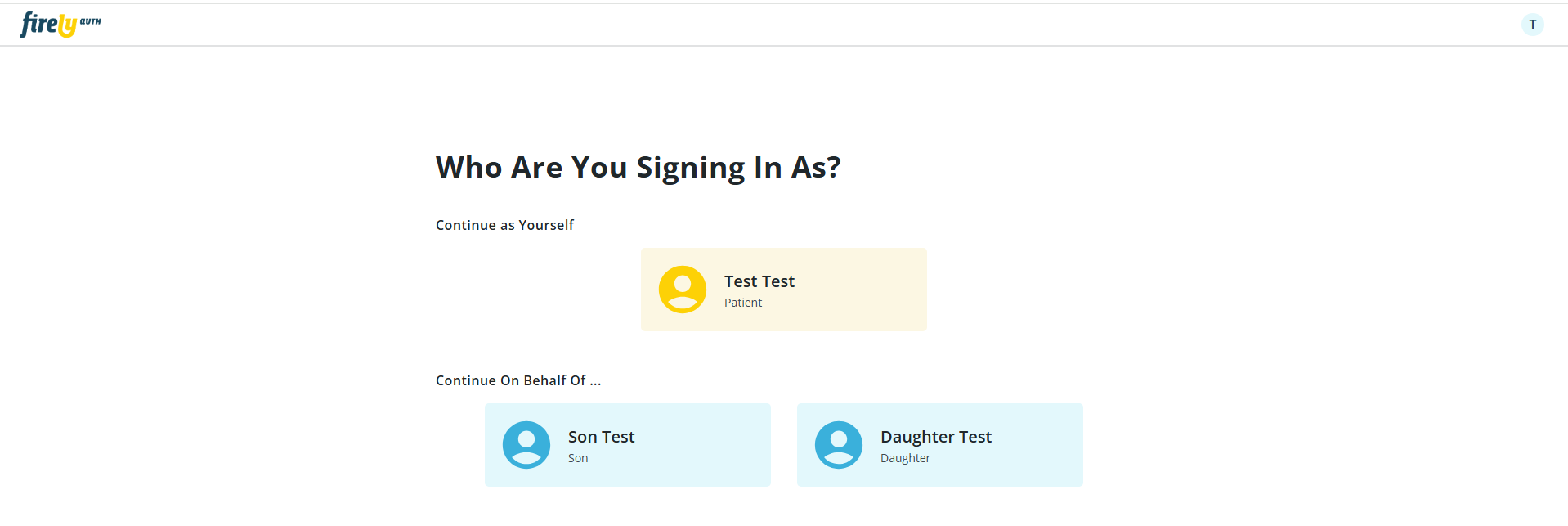
When the Authorized Representatives feature is enabled, user authentication triggers a call to Firely Server’s custom operation to verify existing patient relationships. If relationships are found, users are presented with a selection screen to choose their acting capacity as themselves or on behalf of an authorized patient. The issued access token preserves the original user’s fhirUser identity for audit purposes while setting the patient claim to the selected patient, ensuring access is restricted to that patient’s compartment data.
Warning
This is a beta feature and as such it is subject to change in future releases. Currently, this implementation is not yet working correctly together with all of Firely Auths features, mainly EHR and standalone launch context settings and Disclaimer Registration. On launch context registration, the Authorized Representative feature will be skipped if launch scopes are included in the token request. For disclaimer registration, disclaimers can be accepted once for each representee, but disclaimers that were agreed to in the authorized representative flow will not be visible in the users overview of accepted disclaimers. Due to the experimental nature of this feature, it is recommended to thoroughly test its functionality in a development or staging environment before deploying it to production.
Note
The custom operation $check-authorized-representative-relationships must be implemented on your Firely Server instance to enable Authorized Representative functionality.
This operation must return a Parameters resource with a result parameter set to true if authorized representative relationships exist, which directs the user to a selection screen.
The DAR Selection Screen is only shown if the operation returns true during the authorized code flow. The operation can post relationship details to the Firely Auth Administrative API either synchronously (before returning the response) or asynchronously (after returning the response). The relationship(s) will live in memory for 5 minutes.
Configuration Guide: Enabling Designated Authorized Representatives
Step 1 - Configure Firely Auth Authorized Representatives in the appsettings
You can enable DAR functionality by configuring it in the Firely Auth App Settings be setting LookupOnLogin to true.
"AuthorizedRepresentatives": {
    "LookupOnLogin": true,
    "LookupRequestScopes": "https://fire.ly/fhir/OperationDefinition/has-authorized-representative-relationships",
    "RelationshipsLookupTimeout": 5000, // in ms
    "TitleOnLogin": "Who Are You Signing In As?",
    "TitleOwnProfileOnLogin": "Continue as Yourself",
    "TitleAuthorizedProfilesOnLogin": "Continue On Behalf Of ...",
    "HelpMessageTitleOnFail": "Couldn't load authorized profiles",
    "HelpMessageOnFail": "A technical error prevented loading the user profiles of all authorized users. Please try again by reloading or continue as yourself."
  }
Additionally, the screen for selecting authorized representatives can be customized through various static text settings:
TitleOnLogin: Main title displayed on the page.
TitleOwnProfileOnLogin / TitleAuthorizedProfilesOnLogin: The screen is divided into two sections — one for the user’s own profile and one for authorized profiles. Separate titles can be defined for each section.
HelpMessageTitleOnFail and HelpMessageOnFail: These messages are shown when Firely Auth does not retrieve data in a timely manner, despite the FHIR server returning true for the
$check-authorized-representative-relationshipsoperation (see below).
Step 2 - Register Firely Server DAR Plugin Client in Firely Auth
Log in as an Administrator to the Firely Auth
Navigate to the Clients section and create a new Client for the Firely Server DAR Plugin with the following settings to update the relationships:
Client ID: firely-server-dar-plugin
Client Secret: (a strong secret of your choice)
Client Type: Management API
Allowed Grant Types: Client Credentials
Step 3 - Building the $check-authorized-representative-relationships operation on Firely Server
The custom operation $check-authorized-representative-relationships must be implemented as a plugin on your Firely Server instance. This operation receives the patient parameter from Firely Auth and returns a Parameters resource indicating whether authorized representative relationships exist.
Operation Signature:
URL:
POST [base]/Patient/$check-authorized-representative-relationshipsInput: Parameters resource containing a
patientparameter with the fhirUser referenceOutput: Parameters resource with a
resultparameter (boolean) indicating if relationships exist
Implementation Approach:
The operation should:
Receive and validate the
patientparameter from the input Parameters resourceQuery your data store to check for authorized representative relationships
Return a Parameters resource with
resultset totrueif relationships exist,falseotherwiseOptionally post relationship details to Firely Auth’s Administrative API (either synchronously or asynchronously)
Posting Result of operation Example
This code block demonstrates an example of a parameter resource response for the $check-authorized-representative-relationships operation.
{
    "resourceType": "Parameters",
    "parameter": [
        {
            "name": "result",
            "valueBoolean": true // In case there are additional relationships to be returned
        }
    ]
}
Posting Relationship Details to Firely Auth Administrative API
Posts relationship details to Firely Auth. Note that for this to work, a designated management API client must be configured in Firely Auth that can be used by Firely Server to post the relationship details. In the AuthorizedRepresentativeExampleConfiguration.cs example below, the name and secret for this client are configured statically as firely-server-dar-plugin.
Request: POST to /api/external/authorized-representative
{
    "PatientFullName": "string",
    "PatientId": "string",
    "Relationships": [
        {
            "Id": "string",
            "FullName": "string",
            "Relationship": "string"
        }
    ]
}
Designated Authorized Representative Example Implementation
CheckAuthorizedRepresentativeRelationshipsExampleService.cs
The service is responsible for returning a parameter resource based on the authorized representative relationships.
using System.Net.Http.Headers;
using System.Text.Json;
using Duende.AccessTokenManagement;
using Duende.IdentityModel.Client;
using Hl7.Fhir.ElementModel;
using Hl7.Fhir.Model;
using Hl7.Fhir.Utility;
using Microsoft.Extensions.Logging;
using Vonk.Core.Common;
using Vonk.Core.Context;
using Vonk.Core.Support;
using Parameters = Hl7.Fhir.Model.Parameters;
using ST = System.Threading.Tasks;

namespace Firely.Server.Plugin.CheckAuthorizedRepresentativeRelationships
{
    public class CheckAuthorizedRepresentativeRelationshipsExampleService
    {
        private readonly ILogger<CheckAuthorizedRepresentativeRelationshipsExampleService> _logger;
        private readonly IHttpClientFactory _httpClientFactory;
        private readonly IClientCredentialsTokenManagementService _clientCredentialsTokenManagementService;


        public CheckAuthorizedRepresentativeRelationshipsExampleService(ILogger<CheckAuthorizedRepresentativeRelationshipsExampleService> logger,
            IHttpClientFactory httpClientFactory,
            IClientCredentialsTokenManagementService clientCredentialsTokenManagementService
            )
        {
            Check.NotNull(logger, nameof(logger));
            Check.NotNull(httpClientFactory, nameof(httpClientFactory));
            Check.NotNull(clientCredentialsTokenManagementService, nameof(clientCredentialsTokenManagementService));

            _logger = logger;
            _httpClientFactory = httpClientFactory;
            _clientCredentialsTokenManagementService = clientCredentialsTokenManagementService;
        }

        public async ST.Task CheckAuthorizedRepresentativeRelationshipsOnPost(IVonkContext vonkContext)
        {
            _logger.LogInformation("Processing Custom $check-authorized-representative-relationships example.");

            try
            {
                var requestResource = vonkContext.Request.Payload.Resource;
                if (TryGetParameters(vonkContext, out var checkAuthorizedRepresentativeRelationshipsParameters))
                {
                    _logger.LogDebug("CheckAuthorizedRepresentativeRelationshipsExampleService - Successfully extracted parameters for $check-authorized-representative-relationships");
                    vonkContext.Arguments.ResourceTypeArguments().Handled();
                    await CheckAuthorizedRepresentativeRelationshipsInternal(vonkContext, checkAuthorizedRepresentativeRelationshipsParameters!);
                }
                else
                {
                    _logger.LogDebug("CheckAuthorizedRepresentativeRelationshipsExampleService - Failed to extract parameters for $check-authorized-representative-relationships");
                    vonkContext.Arguments.ResourceTypeArguments().Handled();
                }

            }
            catch (Exception ex)
            {
                _logger.LogDebug("CheckAuthorizedRepresentativeRelationshipsExampleService - Failed to extract parameters for $check-authorized-representative-relationships. Error: {0}", ex.Message);
                vonkContext.Arguments.ResourceTypeArguments().Handled();
            }
        }

        private async ST.Task CheckAuthorizedRepresentativeRelationshipsInternal(IVonkContext vonkContext,
        Parameters checkAuthorizedRepresentativeRelationshipsParameters)
        {
            var fhirUser = checkAuthorizedRepresentativeRelationshipsParameters.GetSingleValue<FhirString>("patient");
            if (fhirUser.IsNullOrEmpty())
            {
                vonkContext.Response.HttpResult = 400;
                vonkContext.Response.Outcome.AddIssue(VonkOutcome.IssueSeverity.Error, VonkOutcome.IssueType.Invalid,
                    "Missing 'patient' parameter. Cannot proceed check of authorized representative relationships.");
                return;
            }

            if (!fhirUser!.Value?.StartsWith("Patient/") ?? false)
            {
                vonkContext.Response.HttpResult = 400;
                vonkContext.Response.Outcome.AddIssue(VonkOutcome.IssueSeverity.Error, VonkOutcome.IssueType.Invalid,
                    "Invalid 'patient' parameter value. The 'patient' parameter must point to a fhirUser of type 'Patient'. Cannot proceed check of authorized representative relationships.");
                return;
            }

            // Do something with the patient id here
            // Fake for "test" patient
            var response = new Parameters();

            var patientId = fhirUser.Value!.Substring(8);

            if (patientId == "test")
            {
                response.Add("result", new FhirBoolean(true));

                _logger.LogDebug("CheckAuthorizedRepresentativeRelationshipsExampleService - Sending relationships to FA");

                var json = JsonSerializer.Serialize(new
                {
                    PatientFullName = "My Test Patient",
                    PatientId = "test",
                    Relationships = new[]
                    {
                    new { Id = "1234", FullName = "Son Test", Relationship = "Son" },
                    new { Id = "0987", FullName = "Daughter Test", Relationship = "Daughter" }
                    }
                }, new JsonSerializerOptions { WriteIndented = true });

                var firelyAuthEndpoint = "http://localhost:5100/api/external/authorized-representative";
                var httpClient = _httpClientFactory.CreateClient(firelyAuthEndpoint);
                var token = await _clientCredentialsTokenManagementService.GetAccessTokenAsync(firelyAuthEndpoint);
                if (!token.IsError)
                    httpClient.SetBearerToken(token.AccessToken!);

                HttpRequestMessage request = new HttpRequestMessage(HttpMethod.Post, firelyAuthEndpoint)
                {
                    Content = new StringContent(json)
                };
                request.Content.Headers.ContentType = new MediaTypeHeaderValue("application/json");
                var res = await httpClient.SendAsync(request);

                _logger.LogDebug($"Relationships Sent to FA Mgmt API. Response {res.StatusCode} received.");

            }
            else
            {
                response.Add("result", new FhirBoolean(false));
            }

            vonkContext.Response.HttpResult = 200;
            vonkContext.Response.Payload = response.ToTypedElement().ToIResource(vonkContext.InformationModel);

            await ST.Task.CompletedTask;
        }

        private bool TryGetParameters(IVonkContext vonkContext, out Parameters? checkAuthorizedRepresentativeRelationshipsParameters)
        {
            checkAuthorizedRepresentativeRelationshipsParameters = null;

            var (request, _, response) = vonkContext.Parts();
            if (!request.GetRequiredPayload(response, out var resource))
            {
                return false;
            }

            try
            {
                checkAuthorizedRepresentativeRelationshipsParameters = resource.ToPoco<Parameters>();
            }
            catch (Exception e)
            {
                vonkContext.Response.HttpResult = 400;
                vonkContext.Response.Outcome.AddIssue(VonkOutcome.IssueSeverity.Error, VonkOutcome.IssueType.Invalid, details: e.Message);
                return false;
            }

            return true;
        }
    }
}
AuthorizedRepresentativeExampleConfiguration.cs
Configuration works the same way as for any other Vonk plugin.
using Duende.IdentityModel.Client;
using Microsoft.AspNetCore.Builder;
using Microsoft.Extensions.DependencyInjection;
using Microsoft.Extensions.DependencyInjection.Extensions;
using Vonk.Core.Context;
using Vonk.Core.Pluggability;

namespace Firely.Server.Plugin.CheckAuthorizedRepresentativeRelationships;

[VonkConfiguration(order: 5600)]
public static class AuthorizedRepresentativeExampleConfiguration
{
    public static IServiceCollection ConfigureServices(this IServiceCollection services)
    {
        var clientCredentialsTokenManagementBuilder = services.AddClientCredentialsTokenManagement();

        var firelyAuthEndpoint = "http://localhost:5100/api/external/authorized-representative";
        clientCredentialsTokenManagementBuilder.AddClient(firelyAuthEndpoint, client =>
        {
            client.ClientId = "firely-server-dar-plugin";
            client.ClientSecret = "firely-server-dar-plugin";
            client.Scope = "http://server.fire.ly/auth/scope/authmanagement";
            client.TokenEndpoint = "http://localhost:5100/connect/token";
            client.Parameters = new Parameters([
                new KeyValuePair<string, string>("aud", "Firely Server")
            ]);
        });

        services.AddClientCredentialsHttpClient(firelyAuthEndpoint, firelyAuthEndpoint, client =>
        {
            client.BaseAddress = new Uri(firelyAuthEndpoint);
        });

        Console.WriteLine("Setting up Auth Rep Plugin Services");
        services.TryAddScoped<CheckAuthorizedRepresentativeRelationshipsExampleService>();
        return services;
    }

    public static IApplicationBuilder ConfigureHandlers(this IApplicationBuilder app)
    {
        return app
            .OnCustomInteraction(VonkInteraction.type_custom, "check-authorized-representative-relationships")
            .AndMethod("POST").AndResourceTypes(new[] { "Patient" })
            .HandleAsyncWith<CheckAuthorizedRepresentativeRelationshipsExampleService>((svc, context) =>
                svc.CheckAuthorizedRepresentativeRelationshipsOnPost(context));
    }
}
Designated Authorized Representative Workflow and Diagram
The DAR authentication flow works as follows:
User initiates login - Standard OAuth2/OIDC flow begins
Firely Auth checks for relationships - Calls custom operation with user’s fhirUser claim
Firely Server validates relationships - Plugin queries your relationship data store
Conditional selection screen - Only shown if relationships exist
Token issuance - Contains both original user identity and selected patient context
The following diagram illustrates the flow of the Designated Authorized Representative lookup process:
┌──────────┐                 ┌─────────────┐                 ┌───────────────┐
│          │                 │             │                 │               │
│   User   │                 │ Firely Auth │                 │ Firely Server │
│          │                 │             │                 │               │
└────┬─────┘                 └──────┬──────┘                 └───────┬───────┘
     │                              │                                │
     │  1. Login                    │                                │
     │─────────────────────────────>│                                │
     │                              │                                │
     │                              │  2. POST $check-authorized-    │
     │                              │     representative-            │
     │                              │     relationships              │
     │                              │     (patient: fhirUser)        │
     │                              │───────────────────────────────>│
     │                              │                                │
     │                              │                                │  3. Query relationships
     │                              │                                │     in data store
     │                              │                                │──┐
     │                              │                                │  │
     │                              │                                │<─┘
     │                              │                                │
     │                              │  4. Response with result       │
     │                              │     (true/false)               │
     │                              │<───────────────────────────────│
     │                              │                                │
     │                              │                                │  5. (Optional) Async POST
     │                              │  6. POST /api/external/        │     relationship details
     │                              │     authorized-representative  │     to Firely Auth Admin API
     │                              │     (relationships details)    │──┐
     │                              │<───────────────────────────────│  │
     │                              │                                │<─┘
     │  7. Selection screen         │                                │
     │     (if result = true)       │                                │
     │<─────────────────────────────│                                │
     │                              │                                │
     │  8. Select capacity          │                                │
     │     (self or representative) │                                │
     │─────────────────────────────>│                                │
     │                              │                                │
     │  9. Access token issued      │                                │
     │     (fhirUser + patient)     │                                │
     │<─────────────────────────────│                                │
     │                              │                                │