
Quality Control: Validating FHIR Projects
This specification describes how to write (and read) rules for the Simplifier Quality Control Engine.

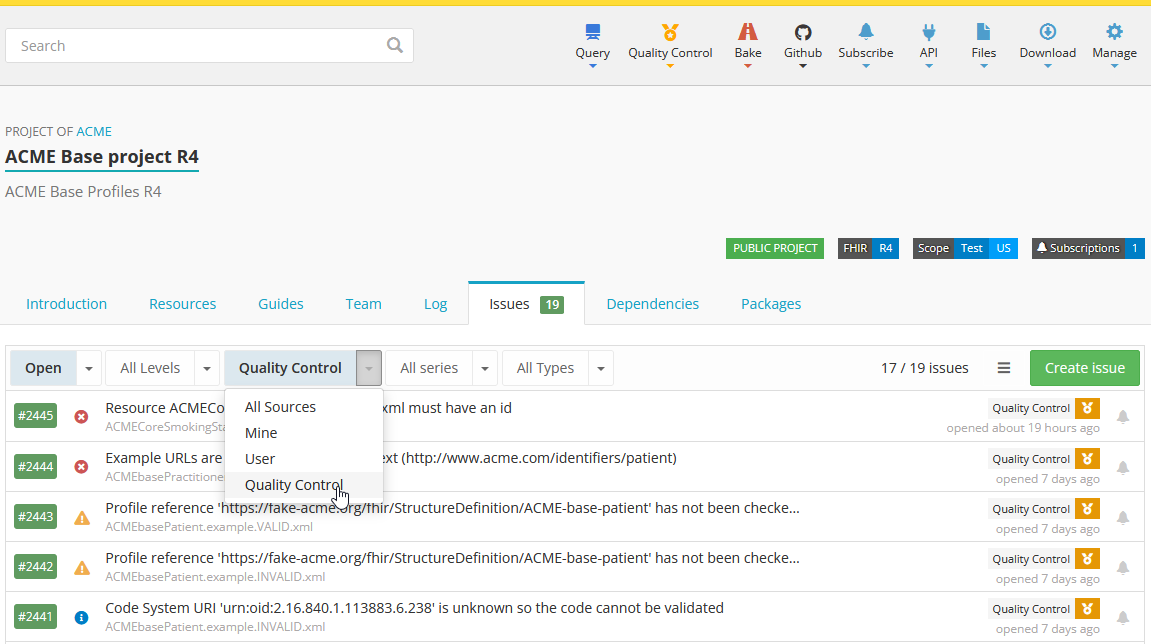
Example of Quality Control being executed on a project
Simplifier.net and Firely Terminal come with a Quality Control engine, helping you to improve the quality of your FHIR projects. The QC engine performs a series of rule checks on selected files in your Simplifier.net projects, on your local computer or at every change of your source code repository. The output of the Quality Control will be saved in your issues tab on a project level. You can filter on Quality Control and you will see the issues found by the Quality Control validation.
There are two default rulesets available, which run FHIR validation on all FHIR resources and a set of rules we at Firely recommend. Additionally, you can define any number of custom business rules to enforce your own custom profiling standards.
Structure
A yaml rules file is named as follows: <name>.rules.yaml. The
default ruleset is called default.rules.yaml
Rulesets
A yaml ruleset file consists of entries, start with a dash, followed by a series of indented key-value pairs: Notice that the comments here are not part of the entry, just an description how to read it.
# comment for first entry

- first: value
  second: value
  third: value

# comment for second entry

- first: value
  second: value
  third: value
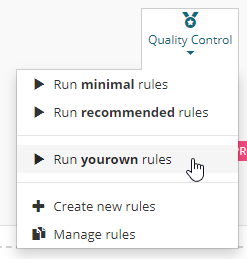
Executing a ruleset in Simplifier.net
Default rulesets
Simplifier will provide a few default rulesets, accessible to every project:
minimal.rules.yaml and recommended.rules.yaml. You can find the most recent version of these rulesets here.
Custom rulesets
You can add other rule files to your project, as long as their name
follows this pattern: <name>.rules.yaml and they are placed in the root
of your project. They will all be discovered by the system, and
exposed in the Quality Control menu of your project, to allow you to run
them.
Examples
Here are some example rules, that you might consider when writing your own rules:
Validating resources in a single folder
This example validates all resources in a single folder. It also suppresses all parsing errors
- action: validate
  files: /examples/*.xml
  suppress: https://simplifier.net/qc/errors/evaluation|PARSING
Checking canonical base URLs
This example validates whether the canonicals for your conformance resources start with the right base URL:
- name: canonical-starts-with
  filter: url.exists() and ImplementationGuide.exists().not()
  # Excluding IGs for now, since they have a Simplifier.net canonical
  status: "Checking if canonical URL starts with correct base"
  predicate: url.startsWith('https://fhir.hl7.org.uk/')
  error-message: "Canonical URL doesn't start with correct base"
Checking if Publisher and Contact are filled (correctly)
Quality Control is a powerfull way to check for consistent metadata
on all of your resources. In this case we are validating if the values
of publisher and contact are filled correctly and whether they
match each other.
- name: publisher-filled
  filter: (StructureDefinition or ValueSet or CodeSystem or CapabilityStatement or SearchParameter or NamingSystem or ConceptMap).exists()
  # Excluding IGs for now, since they don't have a way to set metadata
  status: "Checking if all resources have publisher filled"
  predicate: publisher.exists() and (publisher in ('HL7 UK' | 'NHS Digital'))
  error-message: "Publisher not filled (correctly)"

- name: contact-filled
  filter: (StructureDefinition or ValueSet or CodeSystem or CapabilityStatement or SearchParameter or NamingSystem or ConceptMap).exists()
  # Excluding IGs for now, since they don't have a way to set metadata
  status: "Checking if all resources have contact filled"
  predicate: contact.name.exists() and ('HL7 UK' in contact.name or 'NHS Digital' in contact.name)
  error-message: "Contact not filled (correctly)"

- name: publisher-equals-contact
  filter: (StructureDefinition or ValueSet or CodeSystem or CapabilityStatement or SearchParameter or NamingSystem or ConceptMap).exists()
  # Excluding IGs for now, since they don't have a way to set metadata
  status: "Checking if publisher is one of the contacts"
  predicate: iif(publisher.exists() and contact.name.exists(), publisher in contact.name)
  error-message: "Resource has publisher not listed as one of the contacts"
Validate match between name and id
When your profiling guidelines specify conventions, you can enforce them
easily with Quality Control. Like the below example, where a convention
was decided upon for the name and id property of a ValueSet.
- name: valueset-id-matches-name
  filter: ValueSet.exists()
  predicate: id = name.substring(0,6) + '-' + name.substring(6)
  status: "Checking if all ValueSet ids match the names, including a dash"
  error-message: "ValueSet id must match name with a dash"
Validating correct id naming for Extensions
With Quality Control you can easily filter to specific resources,
like the below case where we are checking the id value only for
Extensions.
- name: extension-starts-with
  filter: StructureDefinition.exists() and StructureDefinition.type = 'Extension'
  status: "Checking whether extension starts with Extension-UKCore"
  predicate: id.startsWith('Extension-UKCore')
  error-message: "Resource does not start with Extension-UKCore"
Validating with different validators
Quality Control now utilizes the Firely .NET SDK Validator as the default engine across Simplifier. This updated validator provides more comprehensive error detection and improved error messages.
If you require specific validation behaviors, you can customize the validator engine using the optional flavor parameter in your Quality Control configuration.
Available Flavors
You can choose one of the following values:
firely (Default): The new Firely .NET SDK Validator. Best for current standard validation and improved issue detection.
netsdk: The Legacy .NET validator. Use this if you need to strictly match older validation logic.
java: The HL7 Java Validator.
To explicitly switch to a specific validator (for example, the legacy netsdk), add the flavor parameter to your validation action:
- category: resource
  action: validate
  flavor: netsdk
Note: You can also toggle between these validators in the Validator Playground using the drop-down menu to test specific resources before adding them to your Quality Control configuration.
Suppression
Quality Control allows you to suppress specific validation errors when they are known to be irrelevant or incorrectly triggered. This can be useful, for example, to suppress an eld-1 error that does not apply to your use case.
Suppression is configured by specifying the error code you want to suppress.
- suppress: eld-1
Note: Suppression currently applies to the entire error code. More fine-grained suppression (for example, targeting a specific element or constraint) is not yet supported.