
API Endpoint
Simplifier.net has multiple APIs available for interacting with the platform and your content on it:
To test these APIs you can see our Postman API documentation or directly run the following Postman collection:

Authentication
JWT authentication
The Simplifier API endpoints are available for Simplifier users based on JWT authentication.
First retrieve a JWT token from Simplifier. This works with a POST at
https://api.simplifier.net/token with your account details in the message body
in JSON format. Header should be Content-Type: application/json.
A token and refreshToken will be returned.
POST https://api.simplifier.net/token

Header:
Content-Type: application/json

Body:
  {
    "Email": "youremail@example.com",
    "Password": "your password"
  }
Next, you can use this token with an authorization header that includes your retrieved token as shown below. The token is valid for a limited time.
GET https://api.simplifier.net/<yourproject>/zip

Header:
Authorization: Bearer <access_token>
Once your token is expired you can use the refreshToken to retrieve new
token and refreshToken pair. The refreshToken has a much longer expiry time.
POST https://api.simplifier.net/token/refresh

Header:
Content-Type: application/json

Body:
  {
    "Token": <token>,
    "RefreshToken": <refreshToken>
  }
Your outstanding refreshTokens are visible at https://simplifier.net/myrefreshtokens, where you can choose to revoke them if you no longer wish them to be valid.
Basic Auth
The ZIP and FHIR API endpoints alternatively also support authentication with Basic Auth directly. However, going forward we recommend the JWT authentication instead.
Features API
The Simplifier Features API allows you to retrieve feautures for your account on the platform, like the feautures your plan gives you access to, the projects you have accesss to and the files within them.
The currently supported calls include:
GET https://api.simplifier.net/myfeatures
Return the features that this user has a right to use in their current plan.
GET https://api.simplifier.net/api/v2/myprojects
Return the Simplifier.net projects for the user.
GET https://api.simplifier.net/api/v3/projects/{{project_urlkey}}/Files
Return a list of files contained in the Simplifier.net project.
Package Server API
To get FHIR Packages via the API, you can use the Simplifier package server API. It serves both publicly published packages, created in Simplifier or beyond, and privately published FHIR packages.
The API for public FHIR packages is documented and can be tested directly on SwaggerHub. The API endpoint of the Simplifier FHIR package Server is: https://packages.simplifier.net. The Simplifier package server is the backend for the official FHIR Package Registry and is also available as https://packages.fhir.org.
The API for private FHIR packages is exactly the same as the public API, but requires authentication. You can use the JWT token you retrieved in the previous section to authenticate your requests. Additionally, it uses the package feed Urlkey as the base URL for the API, for example https://packages.simplifier.net/feeds/mySimplifierPackageFeedUrlkey/ for a package feed with the URL key mySimplifierPackageFeedUrlkey.
Note: It is not possible to create a package using the API. For more information on how to create a package please read our documentation on packages.
NPM compatible endpoint
Besides the regular package endpoint, there is also a more limited NPM compatible endpoint, which allows you to install FHIR package using any NPM client. Keep in mind that this will mix the FHIR packages with your regular NPM packages and does not support FHIR-specific features, like searching on canonicals or FHIR versions.
https://packages.simplifier.net/<package-name>/-/<package-name>-<package-version>.tgz
The above example, then becomes:
https://packages.simplifier.net/hl7.fhir.r3.core/-/hl7.fhir.r3.core-3.0.2.tgz
Project FHIR API
The endpoint of a Simplifier.net project can be used to search for resources in the project
or to read, create and update resources with a FHIR client. History
searches are also supported. To retrieve the endpoint of a project in Simplifier
click on API in the top right menu when visiting either the
project or resource page.
The below image shows the location.
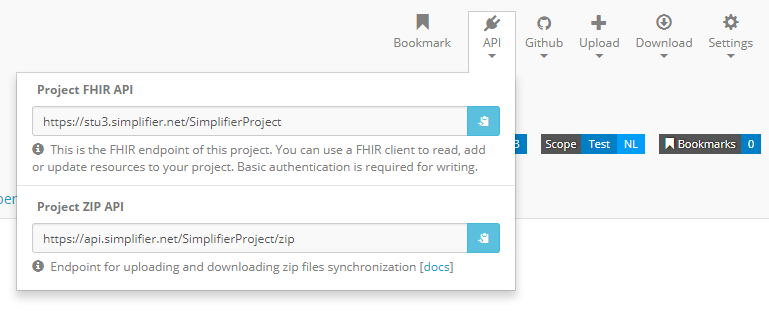
It supports all the API operations like reading, creating or deleting a resource and search.
You can also use this to point Firely Server to a Simplifier.net project via the FHIR API to import the conformance resources. Either via a (manual) import operation or by configuration of the project’s endpoint and authentication in the appsettings.
Project ZIP API
The project ZIP API is available at project level. You can use the ZIP endpoint for synchronization of a complete project. With an HTTP tool you can use GET or PUT on https://api.simplifier.net/<yourproject>/zip to retrieve or update your project in zipped form.